Get Leads in Bulk by Ids
This downloads our complete API collection, including all endpoints—not just
this specific endpoint.
Lets you retrieve multiple leads by passing their lead ids.
- The “LeadIds” parameter is mandatory. You can pass multiple lead Ids here.
- The “Include_CSV” parameter is also mandatory. Pass the columns you want to retrieve here.
Note:
- You can retrieve a maximum of 10,000 leads.
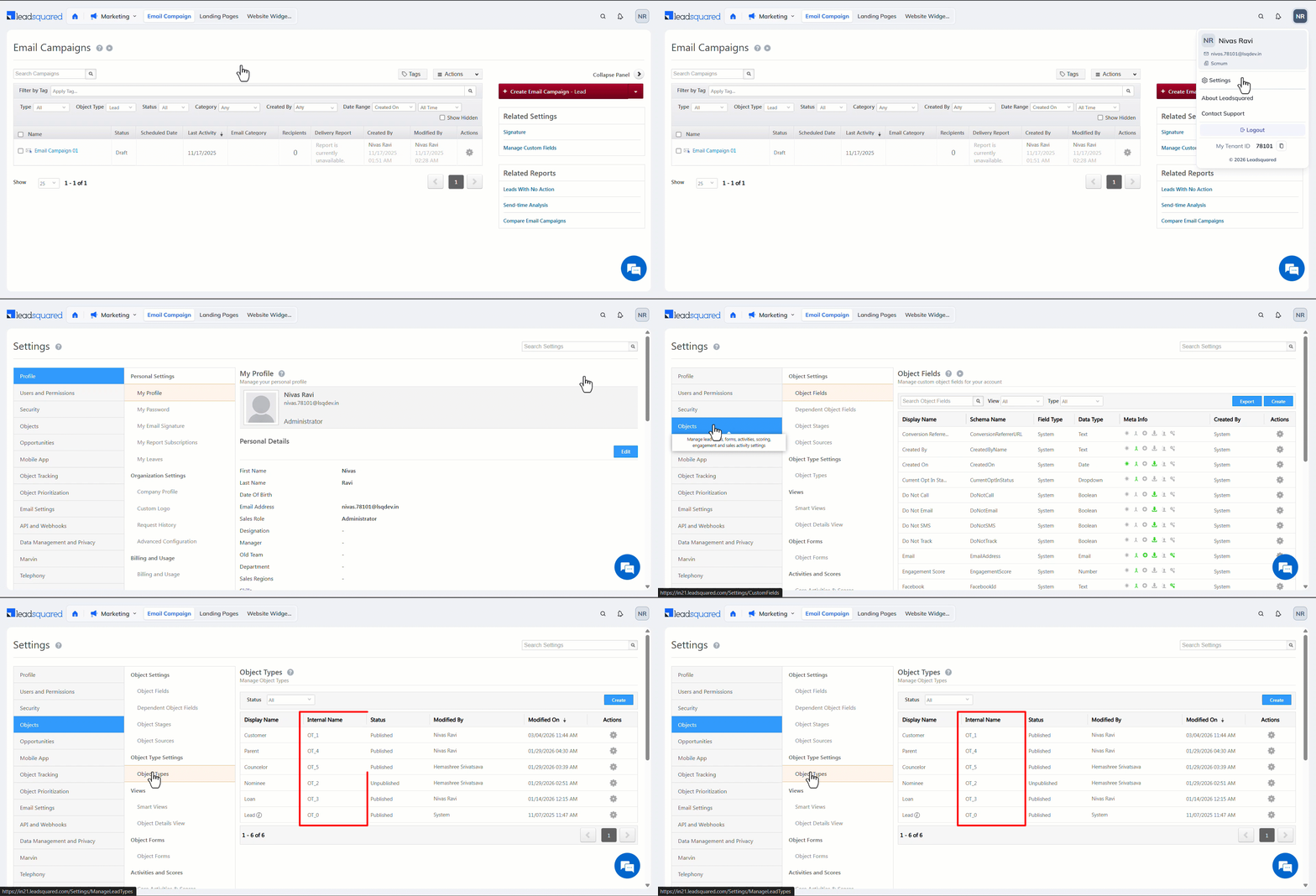
- If Object Types are enabled on your account, in the response, the
LeadTypeis OT_0 by default. This means leads are the default Object Type. If you create custom object types, theLeadTypeis OT_1, OT_2, and so on.- If Object Types are not enabled in your account, you do not see any object type parameters in the response..
API URL
URL

POST
https://{host}/v2/LeadManagement.svc/Leads/Retrieve/ByIds?accessKey=AccessKey&secretKey=SecretKey
Request
Content-Type: application/json
JSON Body/Payload
{
   "SearchParameters":{
      "LeadIds":[
         "cc3fef18-960b-4a60-98c0-af2ab61cee80",
         "5492ac10-3fc9-4114-8d07-04a5e8917b3e",
         "bd595fc2-3678-4004-9ac6-65bfd1caadb5"
      ]
   },
   "Columns":{
      "Include_CSV":"CreatedOn, ModifiedOn, CompanyType, EmailAddress, ProspectId, OwnerIdEmailAddress, ProspectAutoID, FirstName, LastName, ProspectStage, LeadType"
   },
   "Paging":{
      "PageIndex":1,
      "PageSize":1000
   }
}
Request Parameters
| Parameter | Description |
|---|---|
| LeadIds | Pass the lead Ids (also known as the Prospect Id) of the leads you want to retrieve here. |
| Include_CSV | Pass the schema names of the columns you want to retrieve. |
| PageIndex | Specifies the page number. |
| PageSize | Specifies the number of results per page. |
| LeadType | If Object Types are enabled on your account, the LeadType value is OT_0 by default, and you can change it to a custom value (OT_1, OT_2, and so on) only once, after which you cannot update it again. This is optional. |
Response
200 OK
Content-Type: application/json
{
   "RecordCount":3,
   "Leads":[
      {
         "CreatedOn":"2026-02-12 10:37:52.000",
         "ModifiedOn":"2026-02-12 10:51:41.000",
         "EmailAddress":"joe.pesci@example.com",
         "OwnerIdEmailAddress":"srisudhan.78101@lsqdev.in",
         "FirstName":"Joe",
         "LastName":"Pesci",
         "ProspectStage":"Prospect",
         "LeadType":"OT_1"
      },
      {
         "CreatedOn":"2026-02-12 09:18:02.000",
         "ModifiedOn":"2026-02-12 09:18:02.000",
         "EmailAddress":"wim.wenders@example.com",
         "OwnerIdEmailAddress":"srisudhan.78101@lsqdev.in",
         "FirstName":"Wim",
         "LastName":"Wenders",
         "ProspectStage":"Prospect",
         "LeadType":"OT_1"
      },
      {
         "CreatedOn":"2025-11-04 09:07:42.000",
         "ModifiedOn":"2026-02-12 08:24:37.000",
         "EmailAddress":"nivas@leadsquard.com",
         "OwnerIdEmailAddress":"nivas.78101@lsqdev.in",
         "FirstName":"Nivas",
         "LastName":"Ravi",
         "ProspectStage":"Customer",
         "LeadType":"OT_1"
      }
   ]
}
HTTP Response Codes
| Code | Description |
|---|---|
| 200 OK |
This is the status code for successful API call. |
| 401 Unauthorized |
The API call was made with invalid access credentials. Check your AccessKey and SecretKey. |
| 400 Bad Request |
The message body on the request is not as per API specification. Make sure that content type is set to “application/json” and the JSON body has correct attribute names and structure. |
| 404 Not Found |
The API could not be found. Please check the API signature. |
| 429 Too Many Requests |
API calls exceeded the limit of 25 in 5 second(s) |
| 500 Internal Server Error |
The API called failed. There could be many reasons for it. Check the exception message to get more details. |