Update Leads in Bulk
This downloads our complete API collection, including all endpoints—not just
this specific endpoint.
Lets you to update the value of any one field for a maximum of 50 leads.
For example, you can bulk update the lead field “City” (schema name: “mx_City”) to “Bangalore” for 20 leads. To use this API –
- Pass one or more “LeadIds” in the JSON body.
- Pass the schema name of the field in the “Attribute” parameter and the new value in the “Value” parameter.
If you want to update one lead at a time, use the Update Lead API.
Note:
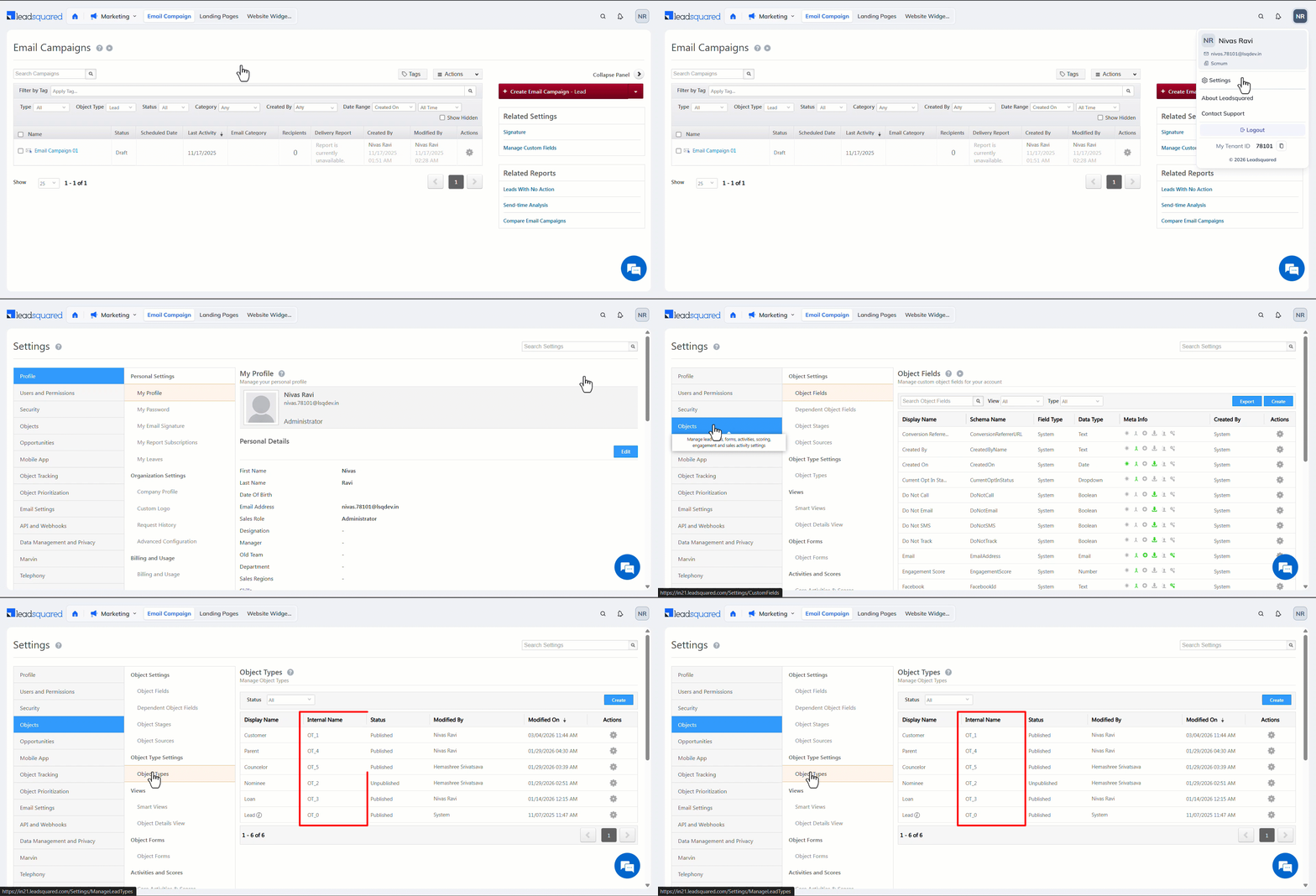
- If Object Types are enabled on your account, the field (
LeadType) value is set to OT_0 by default. - You can change the
LeadTypefrom the default value (OT_0) to a custom value (OT_1, OT_2, and so on) only once. After you change it, you cannot update it again.
API URL
URL

POST
https://{host}/v2/LeadManagement.svc/Lead/Bulk/Update?accessKey=AccessKey&secretKey=SecretKey
Request
Content-Type: application/json
JSON Body/Payload
{
   "LeadIds":[
      "ce7d56da-7864-495e-9c09-3da7e034aac4",
      "95e9618d-e20b-44d0-bb3f-2dbbf268d2fb",
      "b5a4413a-fd4b-464f-9db6-36b20abb8b3e"
   ],
   "LeadFields":[
      {
         "Attribute":"mx_City",
         "Value":"Bangalore"
      },
      {
         "Attribute":"LeadType",
         "Value":"OT_1"
      }
   ]
}
Request Parameters
| Parameter | Description |
|---|---|
| LeadIds | Pass one or more lead Ids (or Prospect Ids). |
| mx_City | Custom field for the lead’s city. |
| LeadType | If Object Types are enabled on your account, the LeadType value is OT_0 by default, and you can change it to a custom value (OT_1, OT_2, and so on) only once, after which you cannot update it again. This is optional. |
Response
200 OK
Content-Type: application/json
{
    "Status": "Success",
    "Message": {
        "AffectedRows": 3
    }
}
HTTP Response Codes
| Code | Description |
|---|---|
| 200 OK |
This is the status code for successful API call. |
| 401 Unauthorized |
The API call was made with invalid access credentials. Check your AccessKey and SecretKey. |
| 400 Bad Request |
The message body on the request is not as per API specification. Make sure that content type is set to “application/json” and the JSON body has correct attribute names and structure. |
| 404 Not Found |
The API could not be found. Please check the API signature. |
| 429 Too Many Requests |
API calls exceeded the limit of 25 in 5 second(s) |
| 500 Internal Server Error |
The API called failed. There could be many reasons for it. Check the exception message to get more details. |