Get Sub-type Values
Retrieves all the ticket sub-type values configured in the account
Note: This API can only be passed by Admin users.
Prerequisite
Before you pass this API, the API Configurations setting must be enabled on your account. To do this –
- On your LeadSquared account, navigate to My Profile>Settings>Service Cloud, and click API Configurations.
- Alongside Enable API, enable the slider
 .
.
- Alongside Enable IP Whitelisting, enable the slider and add the IPs you want to whitelist. This is optional.
- Once you’re done, click Save.

To obtain the tenantID, after logging into your LeadSquared account, click the My Profile icon.
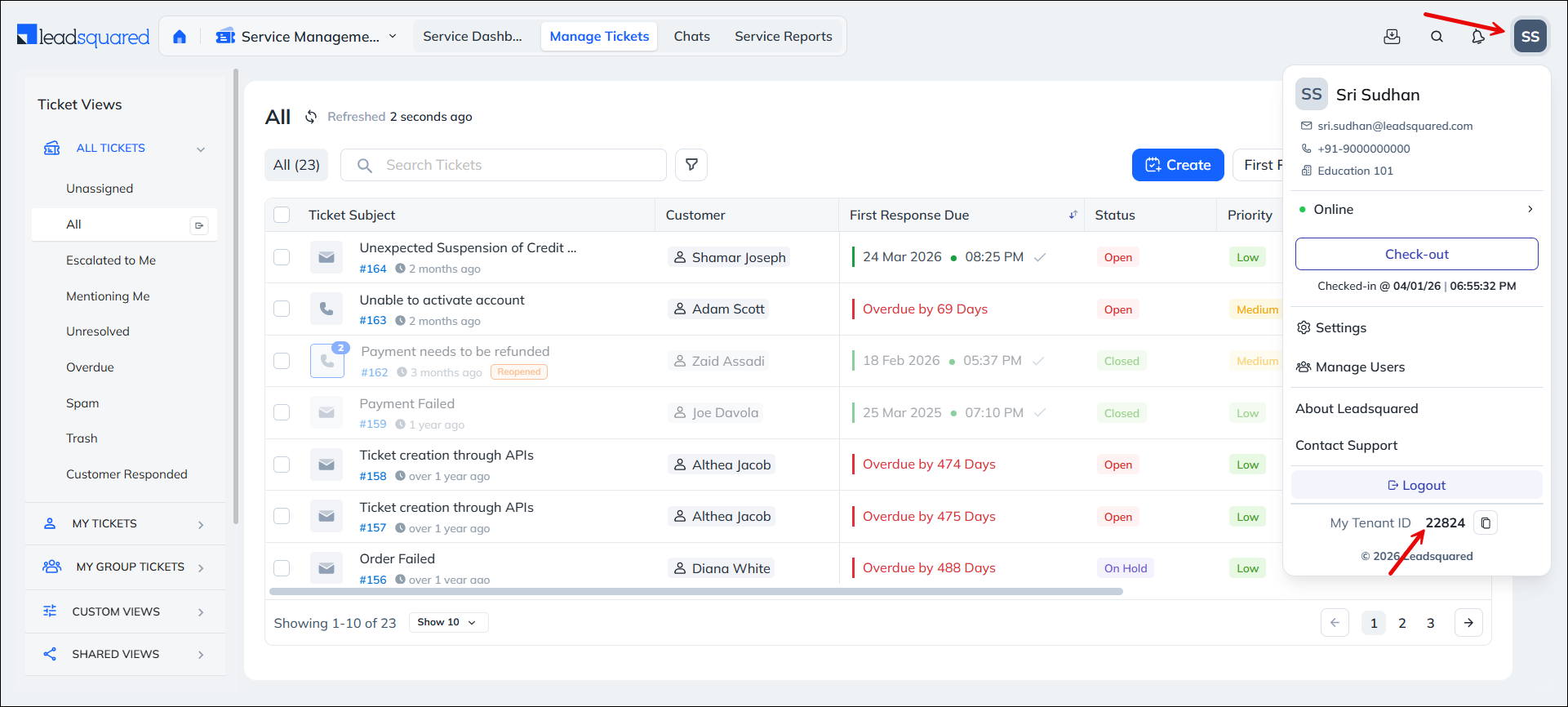
Note: To obtain the host API URL, contact your account manager, or write to scsupport@leadsquared.com.
Pass the following mandatory API headers –
- X-LSQ-ACCESS-KEY – <AccessKey>
- X-LSQ-SECRET-KEY – <SecretKey>
API URL
URL

GET
https://apigw.service-in.leadsquared.com/api/tenants/{{tenantID}}/lookups/SubType/values
Response
200 OK
Content-Type: application/json
[
    {
        "Text": "Acceptable",
        "Value": "Acceptable",
        "SortingOrder": null,
        "Active": null,
        "Deleted": null
    },
    {
        "Text": "Unacceptable",
        "Value": "Unacceptable",
        "SortingOrder": null,
        "Active": null,
        "Deleted": null
    },
    {
        "Text": "Achievable",
        "Value": "Achievable",
        "SortingOrder": null,
        "Active": null,
        "Deleted": null
    },
    {
        "Text": "Not Achievable",
        "Value": "Not Achievable",
        "SortingOrder": null,
        "Active": null,
        "Deleted": null
    },
    {
        "Text": "Supported",
        "Value": "Supported",
        "SortingOrder": null,
        "Active": null,
        "Deleted": null
    },
    {
        "Text": "Feature Request",
        "Value": "Feature Request",
        "SortingOrder": null,
        "Active": null,
        "Deleted": null
    },
    {
        "Text": "Not Applicable",
        "Value": "Not Applicable",
        "SortingOrder": null,
        "Active": null,
        "Deleted": null
    }
]
HTTP Response Codes
| Code | Description |
|---|---|
| 200 OK |
This is the status code for successful API call. |
| 401 Unauthorized |
The API call was made with invalid access credentials. Check your AccessKey and SecretKey. |
| 400 Bad Request |
The message body on the request is not as per API specification. Make sure that content type is set to “application/json” and the JSON body has correct attribute names and structure. |
| 404 Not Found |
The API could not be found. Please check the API signature. |
| 429 Too Many Requests |
API calls exceeded the limit of 25 in 5 second(s) |
| 500 Internal Server Error |
The API called failed. There could be many reasons for it. Check the exception message to get more details. |